Workout planner app

Plan workouts that are easy to follow and repeat

MyFitnessGoals helps athletes and trainers build structured routines, keep workouts consistent, and turn training ideas into sessions people can actually complete.

  • Create routines with exercises, sets, rest, notes, and progression context.
  • Reuse and adjust training plans instead of rebuilding from scratch.
  • Support coached programs and self-directed workouts from one workflow.
  • Organize routines by training day, split, or phase for clear structure.
  • Share routines from trainer to client with one assignment step.

How it works

1

Choose your exercises

Browse the exercise library or add custom movements. Select from categories organized by muscle group and equipment.

2

Set your sets and reps

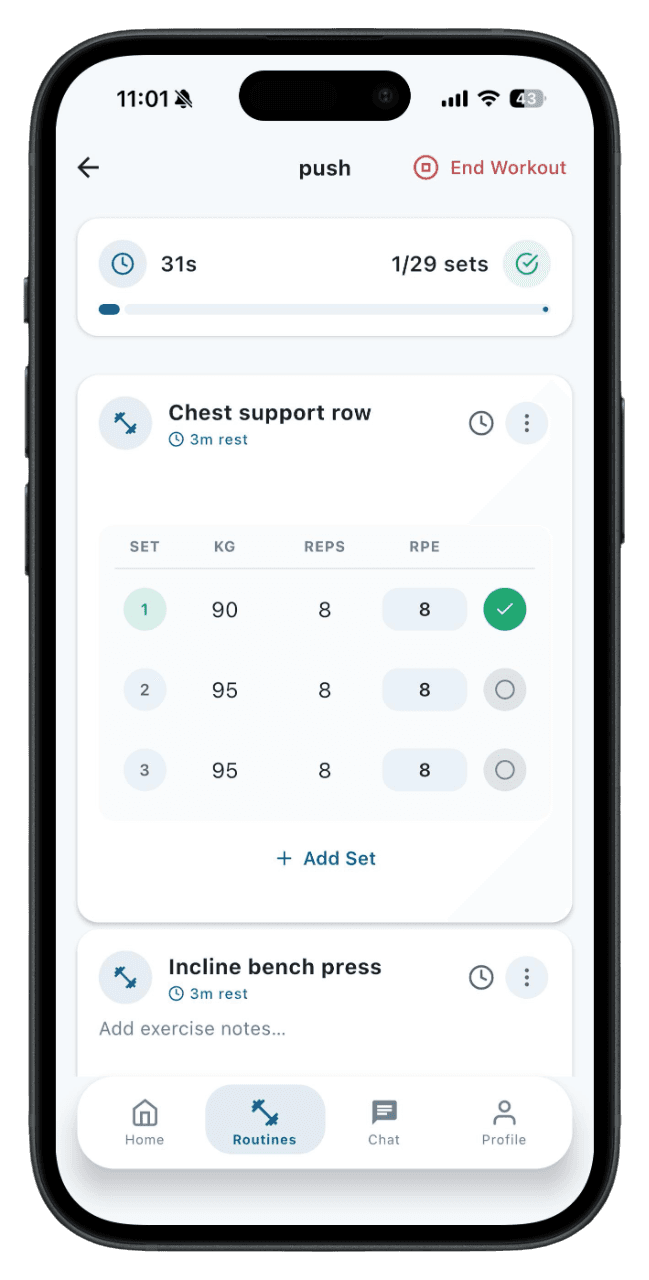
Configure sets, reps, rest periods, and notes for each exercise. Add progression cues so you know when to increase load.

3

Save as a reusable routine

Name your routine and save it. Use it for your own training or, if you're a trainer, assign it to clients.

4

Follow, log, and adjust

Follow the routine during training, log your actual sets, and come back to adjust the plan as your strength improves.

Structure before intensity

Most people fail because training is vague. A clear routine gives each session a purpose and makes consistency easier to maintain. When you know what you're doing before you walk into the gym, you spend less time deciding and more time training.

Planning for trainers

Trainers can build and assign routines to clients, then review completion and progress from the web dashboard. This replaces the back-and-forth of sending plans through chat or email and gives both sides a single source of truth for what was planned and what was actually done.

Planning for athletes

Athletes can create their own routines, follow assigned plans, and keep a repeatable record of what was actually done. The routine builder is flexible enough for simple splits, percentage-based programs, or session-by-session plans.

Adapt without starting over

When a routine needs changes — swapping an exercise, adjusting volume, or adding a new training day — you can edit the existing plan instead of rebuilding it. This saves time and keeps your training history connected to the right program.

Who is this for

Strength training with push-pull-legs or upper-lower splits
Circuit training and conditioning circuits
Sport periodization with peaking and deload phases
Beginner programs with simple full-body routines
Trainer-assigned programs for coached clients

Planning vs just showing up

Walking into the gym without a plan usually means choosing exercises on the spot, doing whatever feels familiar, and hoping it adds up over time. A planned routine removes that uncertainty. When each session has a clear structure — which exercises, how many sets, what rep range, and how much rest — you train with intent instead of impulse. Research consistently shows that people who follow structured programs make more progress than those who train without a plan, even when total effort is similar.

How to structure a training week

A good training week balances stimulus and recovery. The most common splits — push-pull-legs, upper-lower, or full body — distribute volume across muscle groups so nothing is overloaded or neglected. The right split depends on how many days you train, your recovery capacity, and your goals. MyFitnessGoals doesn't prescribe a single approach. Instead, the routine builder lets you create a structure that fits your schedule and then adjust it as your capacity changes.

When to change your workout plan

A program should be changed when it stops producing results, not just because you're bored. Signs that it's time to adjust include stalled strength for more than two weeks, persistent fatigue or soreness, declining motivation, or a change in your training schedule. A good practice is to run a program for at least four to six weeks before making major changes, and to make small adjustments — adding sets, changing rep ranges, swapping one exercise — before overhauling the whole plan.

Planning for trainers vs athletes

Trainers and athletes approach planning from different angles. Trainers need to manage multiple clients, assign routines efficiently, and review whether each client is following the plan. Athletes need routines that are easy to follow during a session, with clear instructions and a way to log what they actually did. MyFitnessGoals handles both. Trainers build and assign from the web platform, athletes follow and log from the mobile app, and both sides see the same training data.

Keep exploring MyFitnessGoals

These pages cover the same training workflow from a different search intent, so you can compare tracking, planning, coaching, and progress use cases.

Free Workout Tracker App: Log Sets, Reps & Progress

MyFitnessGoals gives athletes a clean training log for routines, completed sets, body metrics, and weekly progress while keeping trainers connected to the work their clients actually do.

Read the guide

Personal Trainer Software for Coaches, Studios & PTs

MyFitnessGoals gives personal trainers a practical dashboard for managing clients, building routines, assigning workouts, and reviewing progress without juggling scattered tools.

Read the guide

Client Progress Tracking Software for Personal Trainers

MyFitnessGoals helps trainers understand whether clients are completing training, recovering well, and moving toward measurable outcomes.

Read the guide

Online Coaching Platform for Remote Fitness Trainers

MyFitnessGoals supports trainers who coach clients remotely or hybrid by combining workout planning, client tracking, and progress review in one platform.

Read the guide

Find a Personal Trainer: Browse Profiles in One App

MyFitnessGoals lets you track workouts for free. When you want coaching, browse trainer profiles, find someone who fits your goals, and send a training request — all from the same app.

Read the guide

Gym Workout App for Lifters: Track Strength & Sets

MyFitnessGoals is built around real gym training — barbell lifts, dumbbell work, machine sets, supersets, and the way you actually move between exercises.

Read the guide

Workout Journal App: Searchable Long-Term Training Log

MyFitnessGoals turns every training session into a searchable journal — sets, reps, notes, and how the session felt — so you can review what worked instead of guessing.

Read the guide

See the workflow, not just a feature list

MyFitnessGoals connects planning, workout logging, and progress review so athletes and trainers can inspect what happened instead of relying on scattered notes.

Built for serious training data

Fitness software touches personal progress, habits, and health-adjacent data. The page should make the product easy to evaluate before anyone signs in.

  • Clear contact, privacy, and legal pages are available from every landing page.
  • The mobile app is released on the App Store and Google Play, and the web platform is available on any browser.
  • English and Croatian pages are maintained with matching content and language support.
MyFitnessGoals mobile workout dashboard showing recent training activity

Workout execution

Clients and independent athletes can follow routines, complete sessions, and keep training history in one place.

MyFitnessGoals mobile analytics screen showing progress trends

Progress context

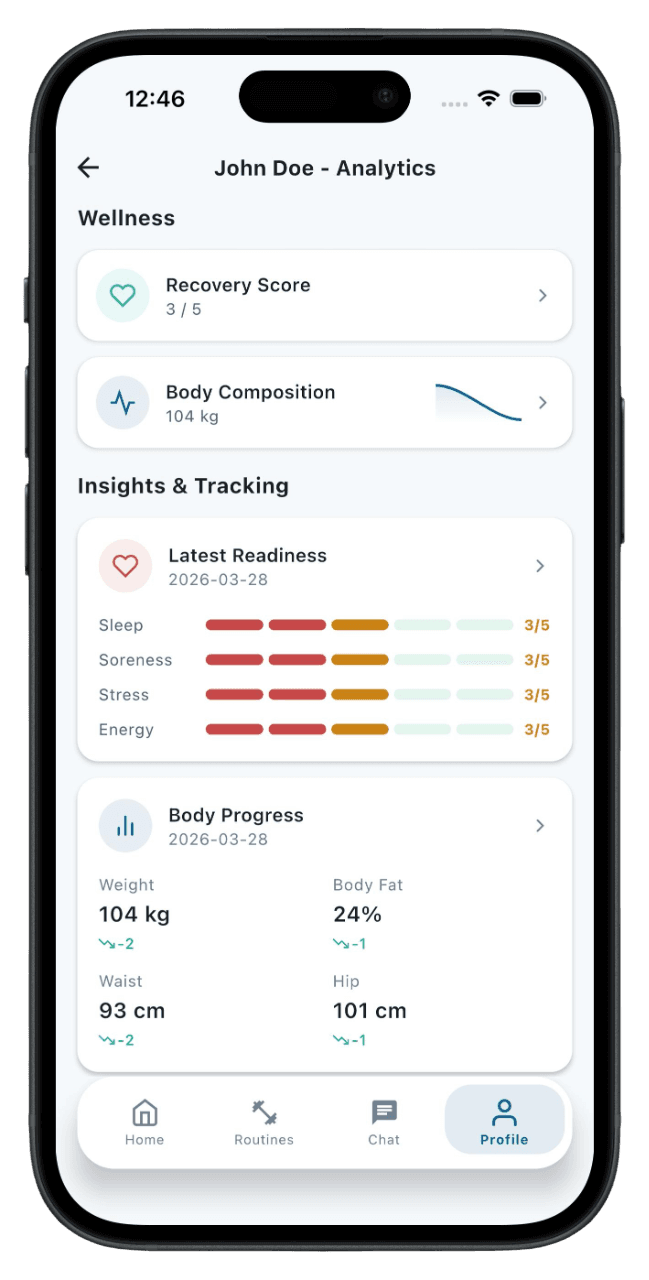
Workout frequency, body metrics, readiness, and strength trends give the next check-in more useful context.

MyFitnessGoals mobile routine screen showing planned exercises

Trainer visibility

The web platform gives trainers a practical view of clients, routines, contracts, and training progress.

Questions this page answers

Can I create my own workout routines?

Yes. MyFitnessGoals supports custom routines for athletes and trainer-assigned plans for coached clients. The routine builder lets you choose exercises, set reps and rest, and add notes for each movement.

Does it replace spreadsheets?

For most training workflows, yes. It keeps planning, logging, and progress review in the same app instead of spreading them across notes and spreadsheets. Your history stays connected to the routine it came from.

How many routines can I create?

There's no hard limit on routines. You can create routines for different training phases, splits, or goals and switch between them as needed.

Can I copy or duplicate a routine?

Yes. You can edit existing routines to create variations without starting from scratch. This is useful when transitioning between training blocks that share most of the same exercises.

Can trainers assign different routines to different clients?

Yes. Each client can have their own assigned routine. Trainers can build routine templates and customize them for individual clients.

Does the app suggest exercises or routines?

MyFitnessGoals provides an exercise library organized by muscle group and equipment. Routines are created by you or your trainer, so they match your actual training program rather than a generic template.

Can I plan rest days and deload weeks?

Rest is part of training. You can structure your routines around your weekly schedule, including lighter sessions or deload weeks, and track how your body responds.

What if my gym doesn't have certain equipment?

The exercise library includes movements sorted by equipment type. You can filter by what's available to you or add custom exercises for equipment your gym has.

Is the routine builder available on mobile?

Routine creation and editing are available on both mobile and web. Trainers typically build routines on the web platform, while athletes can create and manage routines from the mobile app.

Can I add notes to individual exercises?

Yes. Each exercise in a routine can have notes for setup cues, tempo instructions, or reminders. These notes appear when you follow the routine during a workout.

For Athletes and Trainers

Ready to Take Your
Training to the Next Level?

MyFitnessGoals is live on the App Store and Google Play. Download the mobile app to track workouts and follow routines, or contact us to learn more about the trainer platform.