Workout journal app

A workout journal you can actually open again later

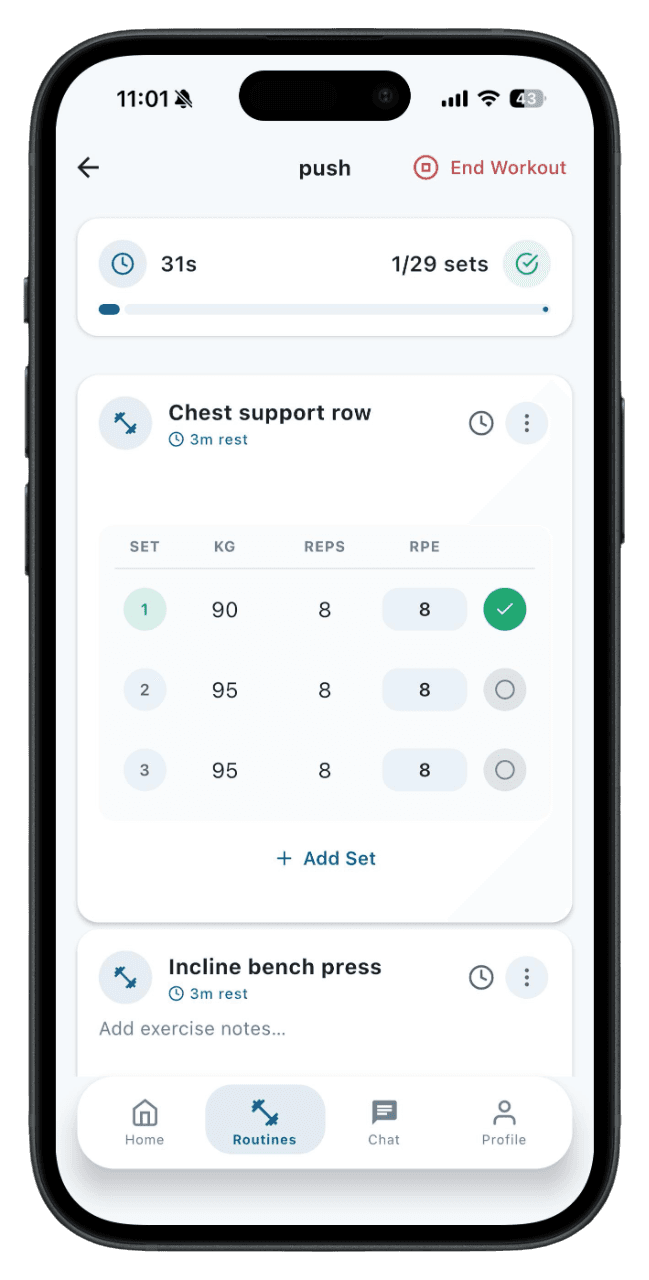
MyFitnessGoals turns every training session into a searchable journal — sets, reps, notes, and how the session felt — so you can review what worked instead of guessing.

  • Keep a per-session journal with sets, reps, weight, and free-text notes.
  • Search your history by exercise, routine, or week to spot patterns.
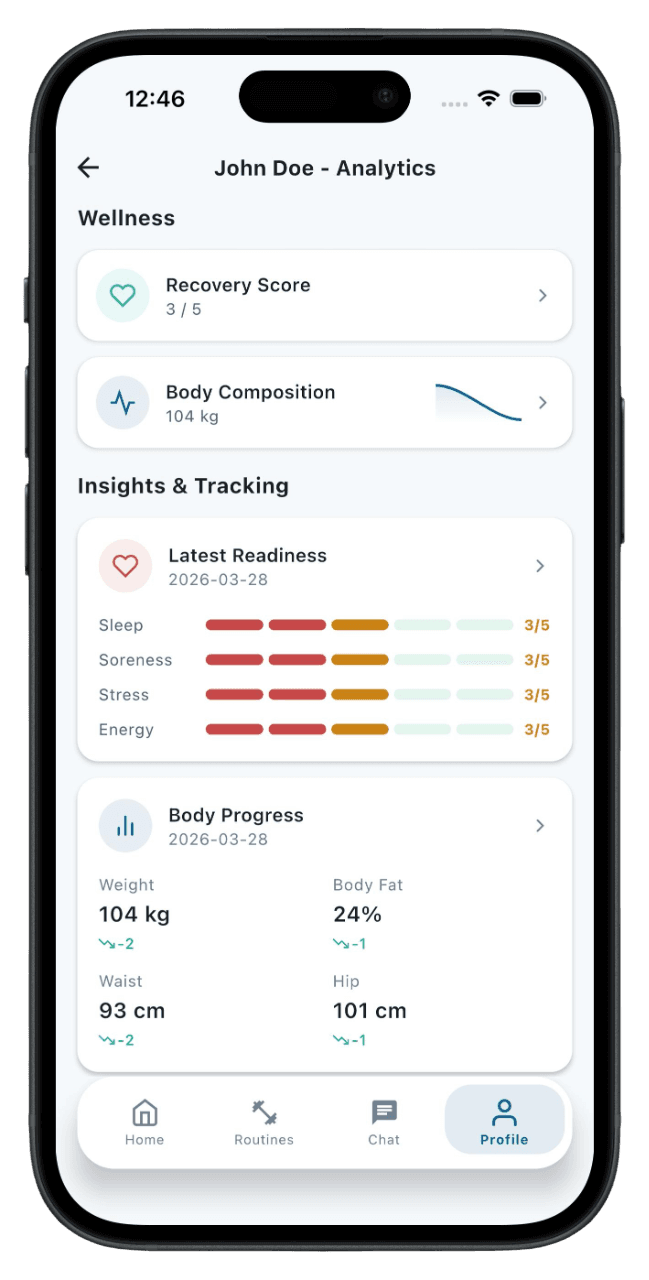
  • Track readiness, sleep, soreness, and body metrics alongside training.
  • Move beyond raw numbers — what you noted six months ago is still here.
  • Use the journal alone, or share it with a trainer for coached feedback.

How it works

1

Log a session

Every completed workout becomes a journal entry automatically — sets, reps, weight, and timestamps.

2

Add notes

Felt heavy, lower back tight, slept poorly, new shoes — whatever matters for context later. Notes attach to the session or to individual exercises.

3

Review your history

Open any past session and see exactly what you did, how you felt, and what you noted. Filter by exercise to compare specific lifts over time.

4

Spot patterns

Trends across weeks and months tell the story. Stalls, peaks, and recovery patterns become visible instead of getting lost in memory.

More than numbers — what you noted matters

A workout log captures sets and reps, but a workout journal also captures the why. MyFitnessGoals lets you attach notes to sessions and individual exercises so the context — sleep, mood, technique cue, equipment swap — stays with the entry. Six months later, you remember why a session went well or badly.

A journal you can actually search

Most training journals end up unreadable after a few months. MyFitnessGoals organizes your history by exercise, routine, and date so finding what you did last block takes seconds. You can review every time you squatted 140 kg, or every entry where you noted lower back pain.

Body data alongside training

Readiness, sleep, body weight, and measurements live next to your training log. When you review a stalled lift you can see whether sleep dropped, weight changed, or readiness suffered in the same window. The journal becomes a narrative, not a list of numbers.

Shareable with a coach when you want one

If you're working with a trainer, your journal is automatically visible to them on the web dashboard. They see your sessions, notes, and trends without you screenshotting anything. Coaching conversations get more useful when both sides are working from the same record.

Who is this for

Strength athletes preparing for a meet reviewing their last 12 weeks
Athletes returning from injury logging pain and fatigue notes
Coached clients giving trainers richer context than a chat thread
Anyone who wants a permanent searchable record of training
Habit builders motivated by seeing a month of completed sessions

Why memory fails for training decisions

Most people overestimate how much they lifted and underestimate how long ago they changed their plan. Memory is unreliable for set-by-set details, warm-up weights, rep ranges, and how a lift felt on a given day. A training journal removes that guesswork. When the record is accurate, you can review what worked, what stalled, and what to adjust without relying on impressions.

What to write in a workout journal

The most useful notes are short and specific. Record perceived effort, technique cues you focused on, anything unusual about the equipment or environment, and how you felt — energy, soreness, stress. Over time these notes turn into a personal coaching reference. The MyFitnessGoals journal makes adding notes fast so you actually keep doing it.

Reviewing weekly, monthly, and per training block

A useful review cadence is lightweight weekly check-ins combined with a deeper review every four to six weeks. Weekly reviews catch missed sessions and readiness drops. Block reviews ask whether the program is producing the strength or body changes you wanted. Journal data makes both reviews possible because the record is already structured.

Sharing your journal with a coach

If you bring a coach into the picture, the journal becomes a shared document. Your trainer sees every session you logged, every note you wrote, and the body metrics you tracked. This is a different starting point than handing them a blank slate — they can build a program from real history instead of guesswork.

Keep exploring MyFitnessGoals

These pages cover the same training workflow from a different search intent, so you can compare tracking, planning, coaching, and progress use cases.

Free Workout Tracker App: Log Sets, Reps & Progress

MyFitnessGoals gives athletes a clean training log for routines, completed sets, body metrics, and weekly progress while keeping trainers connected to the work their clients actually do.

Read the guide

Workout Planner App: Build Custom Gym Routines Fast

MyFitnessGoals helps athletes and trainers build structured routines, keep workouts consistent, and turn training ideas into sessions people can actually complete.

Read the guide

Personal Trainer Software for Coaches, Studios & PTs

MyFitnessGoals gives personal trainers a practical dashboard for managing clients, building routines, assigning workouts, and reviewing progress without juggling scattered tools.

Read the guide

Client Progress Tracking Software for Personal Trainers

MyFitnessGoals helps trainers understand whether clients are completing training, recovering well, and moving toward measurable outcomes.

Read the guide

Online Coaching Platform for Remote Fitness Trainers

MyFitnessGoals supports trainers who coach clients remotely or hybrid by combining workout planning, client tracking, and progress review in one platform.

Read the guide

Find a Personal Trainer: Browse Profiles in One App

MyFitnessGoals lets you track workouts for free. When you want coaching, browse trainer profiles, find someone who fits your goals, and send a training request — all from the same app.

Read the guide

Gym Workout App for Lifters: Track Strength & Sets

MyFitnessGoals is built around real gym training — barbell lifts, dumbbell work, machine sets, supersets, and the way you actually move between exercises.

Read the guide

See the workflow, not just a feature list

MyFitnessGoals connects planning, workout logging, and progress review so athletes and trainers can inspect what happened instead of relying on scattered notes.

Built for serious training data

Fitness software touches personal progress, habits, and health-adjacent data. The page should make the product easy to evaluate before anyone signs in.

  • Clear contact, privacy, and legal pages are available from every landing page.
  • The mobile app is released on the App Store and Google Play, and the web platform is available on any browser.
  • English and Croatian pages are maintained with matching content and language support.
MyFitnessGoals mobile workout dashboard showing recent training activity

Workout execution

Clients and independent athletes can follow routines, complete sessions, and keep training history in one place.

MyFitnessGoals mobile analytics screen showing progress trends

Progress context

Workout frequency, body metrics, readiness, and strength trends give the next check-in more useful context.

MyFitnessGoals mobile routine screen showing planned exercises

Trainer visibility

The web platform gives trainers a practical view of clients, routines, contracts, and training progress.

Questions this page answers

Is this a paper-journal replacement?

Yes, and more. The app captures everything a paper journal does — sets, reps, notes — plus searchability and trends that paper can't offer.

Can I add free-text notes per exercise?

Yes. Notes attach to entire sessions or to individual exercises. Use them for technique cues, equipment changes, or how a lift felt.

Can I look up a specific workout from six months ago?

Yes. The journal is fully searchable by date, exercise, and routine. You can pull up any session in your history in seconds.

Does it include readiness or soreness tracking?

Yes. You can log readiness signals and body metrics alongside training, and the journal surfaces them together so context is one tap away.

Can a trainer see my journal entries?

Only if you're working with a trainer through MyFitnessGoals. In that case, your training journal, notes, and metrics are visible on the trainer's dashboard.

Can I export my journal?

Your training data belongs to you. You can review the full journal inside the app, and export features are available through the platform.

What if I forget to log a session?

You can backfill a session manually with the date, exercises, sets, and notes. Better late than never — the journal stays useful even with occasional gaps.

Is the journal private?

Yes. Your training data is private by default. Trainers only see data from clients they actively coach, and only the data that's part of the coaching relationship.

Does it work offline?

Yes. You can log sessions offline and the journal syncs when you're back online. Your entries are never lost.

Is the app free?

Yes, MyFitnessGoals is free for athletes with full journal, tracking, and routine features. Trainers have separate plans based on roster size.

For Athletes and Trainers

Ready to Take Your
Training to the Next Level?

MyFitnessGoals is live on the App Store and Google Play. Download the mobile app to track workouts and follow routines, or contact us to learn more about the trainer platform.